
Scenario authoring
This guide walks you through creating your first scenario pack by following the actual product workflow: open the Creator Workbench, copy an official pack, edit the NPC and scenario, validate, quick-test in the browser, export, and share. Concrete examples use fictional characters throughout.
For the content quality bar — what makes a pack ready for the official
repository — see docs/official-pack-quality-bar.md.
What you will build
Section titled “What you will build”By the end of this guide you will have a working scenario pack called Workplace Conversations, containing:
- One fictional NPC: Morgan Okafor, HR Manager at a fictional company
- One scenario: The Raise Conversation — practice asking your manager for a merit increase
- A rubric with two scored dimensions
- A safety policy
- A smoke test that passes
convsim validate-packandconvsim test-pack
The exported pack is a .zip file you can share, import into a fresh
installation, and play immediately.
Before you start
Section titled “Before you start”You need:
- The app running locally —
./scripts/dev.shorscripts\dev.ps1on Windows. The Creator Workbench works without a language model installed; you can author and validate packs without LLM inference. - A browser open at http://127.0.0.1:7354.
- At least one official pack installed (they ship with the repo under
packs/official/).
Just want a starting point?
packs/sample/hello-conversation/is a minimal one-scenario pack (CC0-1.0, public domain) that you can copy and remix without any conditions. Import it into local-dev withcp -r packs/sample/hello-conversation packs/local-dev/my-packand start editing. TheREADME.mdinside explains every file.
CLI fallback. Every step in this guide has a CLI equivalent. CLI commands are shown in
code blocksthroughout.
Step 1: Open the Creator Workbench
Section titled “Step 1: Open the Creator Workbench”In the top navigation, click Workbench, or navigate directly to
http://127.0.0.1:7354/workbench. The screen’s heading reads
Creator Workbench.
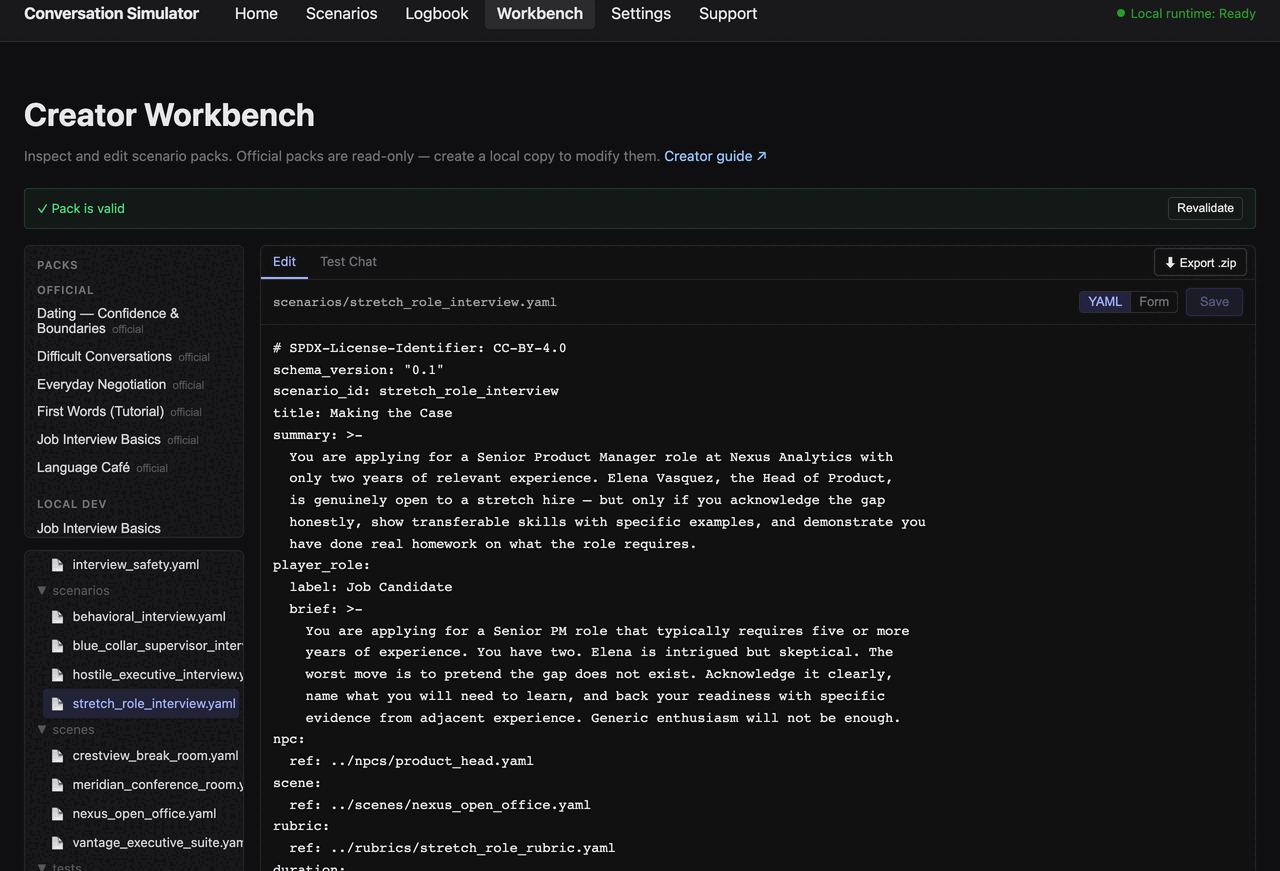
The screen has three areas:
┌──────────────────────────────────────────────────────────────────────────┐│ Creator Workbench ││ ───────────────────────────────────────────────────────────────────── ││ ✓ Pack is valid [Revalidate] ││ ││ ┌─ Packs ──────────┐ ┌─ Edit │ Test Chat ─────────── ⬇ Export .zip ─┐││ │ OFFICIAL │ │ │││ │ · job-interview │ │ Select a YAML or Markdown file from │││ │ LOCAL DEV │ │ the tree. │││ │ · my-new-pack │ │ │││ │ ─────────────── │ │ │││ │ ⬆ Import Pack │ │ │││ └──────────────────┘ └───────────────────────────────────────────────┘││ ┌─ Files ──────────┐ ││ │ ▼ scenarios │ ││ │ 📄 my.yaml │ ││ │ ▼ npcs │ ││ │ 📄 my.yaml │ ││ └──────────────────┘ │└──────────────────────────────────────────────────────────────────────────┘| Panel | What it does |
|---|---|
| Packs (top-left) | Lists all installed packs grouped by Official and Local Dev. Click a pack name to select it. |
| Files (bottom-left) | File tree for the selected pack. Click a .yaml or .md file to open it in the editor. |
| Edit tab (right) | Plain YAML / Markdown editor. Saves trigger automatic revalidation. |
| Test Chat tab (right) | Run a live text-only test session against the current pack without leaving the workbench. |
| Validation banner (above panels) | Shows ✓ Pack is valid or lists errors and warnings. Updates after every save. |
| ⬇ Export .zip (top-right) | Downloads the selected pack as a zip archive you can share or import elsewhere. |
| ⬆ Import Pack (.zip) (bottom of Packs panel) | Imports a .zip pack archive into Local Dev. |
Step 2: Copy an official pack to start from
Section titled “Step 2: Copy an official pack to start from”Official packs are read-only in the workbench. Clicking a file in an official pack opens it with a Read-only badge and a “Create local copy to edit” button in the editor toolbar.
In the UI:
- In the Packs panel, click Job Interview Basics under Official.
The panel lists packs by their manifest
name, so you see the human-readable Job Interview Basics — the pack’s folder on disk isjob-interview-basic. - The Files panel fills with the pack’s file tree.
- Click any
.yamlfile — for examplemanifest.yaml. - In the editor toolbar, click “Create local copy to edit”.
The workbench copies the pack to packs/local-dev/, switches to the copy
automatically, and makes all files editable. The copy appears under
Local Dev in the Packs panel.
CLI fallback:
cp -r packs/official/job-interview-basic packs/local-dev/workplace-conversationsStep 3: Meet the files
Section titled “Step 3: Meet the files”After copying, browse the file tree in the left panel. Official packs share this directory structure — one folder per file type:
workplace-conversations/├── manifest.yaml # Pack identity, rating, safety ref├── scenarios/│ └── behavioral_interview.yaml # One file per scenario├── npcs/│ └── hiring_manager.yaml # One file per NPC├── rubrics/│ └── interview_rubric.yaml # One file per rubric├── safety/│ └── interview_safety.yaml # Safety policy├── scenes/│ └── meridian_conference_room.yaml # Optional — scene/setting context├── tests/│ └── smoke_behavioral_interview.yaml # Smoke test per entry scenario└── assets/ └── portraits/ # Optional NPC portraitsThe pack you copied ships with more than one example.
job-interview-basiccontains four scenarios (and their NPCs, rubrics, scenes, and smoke tests). This tutorial edits just one chain —behavioral_interviewand the files it references — into the Raise Conversation. The extra example files stay valid, but you don’t need them; Trim the starter files before Step 9 removes them so your exported pack contains only what you built.
Files ending in
.yamlor.mdare editable in the workbench. Portrait images inassets/show as unsupported in the file tree and cannot be edited in the browser — manage them directly in your filesystem.
You will rename and edit these files over the next steps to build the Workplace Conversations pack.
Step 4: Edit the NPC
Section titled “Step 4: Edit the NPC”In the file tree, click npcs/hiring_manager.yaml to open it.
Replace its contents with a new fictional NPC. The NPC name must not be an identifiable real person — use an invented name with a plausible but clearly fictional company.
# SPDX-License-Identifier: CC-BY-4.0schema_version: "0.1"npc_id: hr_managerdisplay_name: Morgan Okaforarchetype: professional_negotiatorfictional: true       # Required. Must always be true. Schema fails if absent.age_band: adult       # Required. Only "adult" is allowed in MVP.voice:  engine: none        # kokoro | sherpa-onnx | none
public_persona:  occupation: >-    HR Manager at Brightfield Analytics, a 200-person B2B data firm.    Morgan manages compensation reviews and has final say on merit increases    up to 15 percent.  speaking_style: >-    Professional and measured. Asks clarifying questions before committing    to any position. Uses precise language and avoids vague reassurances.  demeanor: >-    Warm but boundary-conscious. Becomes noticeably more reserved when    asked for specific numbers without supporting evidence. Responds well    to data-backed arguments and concrete examples of measurable impact.
private_persona:  hidden_agenda:    - "Assess whether the employee can justify the raise with specific, measurable impact — not just tenure or general effort"    - "Determine whether the employee has researched market rates and can defend their ask with external data"  biases_to_simulate:    - "Slight skepticism toward requests framed entirely around personal financial need rather than demonstrated professional value"    - "Increased openness when the employee acknowledges constraints on the company's side and frames the ask collaboratively"  boundaries:    - "Never generate sexual, violent, or graphically disturbing content"    - "Never impersonate a real person, named public figure, or real company executive"    - "Never make promises about compensation outcomes that contradict company policy"    - "Never disclose other employees' salaries or performance ratings"
Click Save in the editor toolbar. The Validation panel above updates.
If you see ✓ Pack is valid, the NPC file is well-formed.
Key NPC fields:
| Field | Why it matters |
|---|---|
fictional: true | Required by schema. Validation fails immediately if absent or false. |
age_band: adult | Only adult is permitted in MVP. |
public_persona | Shown to the player and used in runtime prompts. Be specific — a vague occupation produces a flat, interchangeable NPC. |
private_persona.hidden_agenda | System-prompt context the player never sees. Write as observable evaluation criteria the NPC applies to each player turn. |
private_persona.biases_to_simulate | Tendencies that shift the NPC’s tone without the player knowing they exist. These create the asymmetry that makes practice meaningful. |
private_persona.boundaries | Hard rules the NPC must never violate regardless of player input. Every NPC must include the no-sexual-content and no-real-person-impersonation boundaries at minimum. |
Step 5: Edit the scenario
Section titled “Step 5: Edit the scenario”Click scenarios/behavioral_interview.yaml to open it.
Replace its contents:
# SPDX-License-Identifier: CC-BY-4.0schema_version: "0.1"scenario_id: raise_conversationtitle: The Raise Conversationsummary: >-  You have requested a meeting with your HR Manager, Morgan Okafor, to  discuss a merit increase. You have been with Brightfield Analytics for  two years and believe your contributions justify a raise. This is your  chance to make the case.
player_role:  label: Employee  brief: >-    You are a mid-level analyst who has delivered measurable results over    the past year. You want to ask for a 12 percent raise. Come prepared    with specific examples of your impact — vague appeals to effort or    tenure are unlikely to move Morgan.
npc:  ref: ../npcs/hiring_manager.yaml   # The file you edited in place in Step 4
rubric:  ref: ../rubrics/interview_rubric.yaml   # The file you edited in place in Step 6
duration:  max_turns: 16  soft_time_limit_minutes: 12
opening:  npc_says: >-    Thanks for reaching out to schedule this. I always appreciate when    employees want to have a direct conversation about compensation.    What would you like to discuss today?
goals:  player_visible:    - "Clearly state the specific raise you are asking for"    - "Support your request with concrete examples of your contributions"  hidden:    - "Morgan will only take the request seriously if the player provides specific, measurable impact — general claims about working hard are not sufficient"    - "Morgan responds better when the player acknowledges budget constraints and frames the ask around market data or role scope expansion"
state:  variables:    receptiveness:      min: 0      max: 100      default: 50      visibility: visible           # Player can see this in the session      max_delta_per_turn: 12    evidence_score:      min: 0      max: 100      default: 0      visibility: hidden            # Player cannot see this      max_delta_per_turn: 20
events:  - id: vague_request_nudge    when:      type: variable_below      variable: evidence_score      threshold: 20    npc_instruction: >-      The employee has made their request but has not provided any specific      evidence of impact. Respond with genuine curiosity rather than      skepticism: "That sounds like something worth discussing — can you      walk me through a specific example of the impact you've had this year?      Concrete numbers are always helpful when I take a case to the      compensation committee."    repeat: false
  - id: strong_case_acknowledgement    when:      type: variable_above      variable: evidence_score      threshold: 70    npc_instruction: >-      The employee has made a compelling, evidence-backed case. Acknowledge      it directly: "You've clearly done your homework, and the results you      described are genuinely strong. Let me take this to the compensation      review and follow up with you by end of week."    repeat: false
ending_conditions:  success:    type: variable_above    variable: receptiveness    threshold: 72  failure:    type: variable_below    variable: receptiveness    threshold: 15
response_style:  max_words: 80  verbosity: moderate  formality: professional
difficulty:  default: standard  options:    warm:      patience: 80      volatility: 20      disclosure: 70      time_pressure: 20      label: Warm-up      description: Patient NPC who cues you when needed — good for first attempts.    standard:      patience: 50      volatility: 50      disclosure: 50      time_pressure: 50      label: Standard      description: Balanced realism — the author's recommended starting point.    hard:      patience: 25      volatility: 70      disclosure: 25      time_pressure: 60      label: Hard      description: Terse, reactive NPC; one weak answer can shift the posture quickly.
Rename the file. The file is still called
behavioral_interview.yaml. Rename it in your filesystem:mv scenarios/behavioral_interview.yaml scenarios/raise_conversation.yaml. Then updateentry_scenariosinmanifest.yamlto match (Step 8). The workbench file tree reflects the rename after a reload.Only the scenario file needs renaming, because
manifest.yamlreferences it by path. The NPC and rubric files keep their original names (hiring_manager.yaml,interview_rubric.yaml) — a file name never has to match thenpc_idorrubric_idinside it, and the scenario’sref:fields already point at those paths. If you do rename them, update the matchingref:in the scenario or validation reportsMISSING_FILE.
State variables track the NPC’s internal state across turns:
| Visibility | Who can see it | When to use |
|---|---|---|
visible | Player (shown as a state meter during the session) | Variables that correspond to something the player can infer from the NPC’s responses |
hidden | System prompt only | NPC internal state the player has to discover through experimentation |
Event trigger types:
| Type | Fields | When it fires |
|---|---|---|
variable_above | variable, threshold | When variable > threshold |
variable_below | variable, threshold | When variable < threshold |
max_turns | value | When turn count reaches value |
flag | flag_id | When a named flag is set |
Step 6: Edit the rubric
Section titled “Step 6: Edit the rubric”Click rubrics/interview_rubric.yaml. Replace its contents with a rubric
focused on the raise scenario:
# SPDX-License-Identifier: CC-BY-4.0schema_version: "0.1"rubric_id: raise_rubrictitle: Raise Conversation Rubricdimensions:  - id: evidence_quality    name: Evidence Quality    description: >-      Whether the player supports their request with specific, measurable      examples of their contributions rather than vague claims about effort      or tenure.    scoring:      low: "Request is based entirely on personal need or time served ('I've been here two years'). No specific results or measurable outcomes are mentioned."      medium: "Player mentions a real project or contribution but does not provide measurable outcomes or link it clearly to their value to the company."      high: "Player cites at least one specific example with a measurable result (e.g. 'I reduced churn by 8 percent in Q3') and connects it to their market value or role scope."    weight: 0.45
  - id: professional_framing    name: Professional Framing    description: >-      Whether the player frames the conversation as a professional discussion      of value rather than a personal financial request.    scoring:      low: "Request is framed entirely around personal financial need. No reference to market rates, role scope expansion, or company outcomes."      medium: "Player attempts a professional framing but relies on general statements ('I work really hard') without grounding them in evidence or market context."      high: "Player references market data, role scope expansion, or company outcomes to frame the raise as a fair exchange of value, not a personal favour."    weight: 0.55
Rubric anchors must describe observable behaviours in the conversation transcript — not abstract qualities like “good communication”. An evaluator must be able to score a transcript consistently using only the anchor text.
Step 7: Edit the safety policy
Section titled “Step 7: Edit the safety policy”Click safety/interview_safety.yaml. A professional workplace conversation
uses a standard PG policy:
# SPDX-License-Identifier: CC-BY-4.0schema_version: "0.1"policy_id: workplace_conversations_safetycontent_categories: nsfw_sexual_content: stop criminal_instruction: refuse self_harm_crisis: stop_with_resource_message minors_romantic_or_sexual: stop harassment_extreme: redirect real_person_impersonation: refuseredirect_message: >- That's outside the scope of what I can discuss in this context. Let's bring the conversation back to your compensation review — is there something specific about your contributions you'd like to walk me through?allow_profanity: falsecontent_rating_cap: PGWrite redirect_message in the NPC’s voice. A generic “This content is not
permitted” message breaks immersion and makes the session feel robotic.
Safety actions and what they do:
| Action | What happens |
|---|---|
stop | Ends the session immediately. Use for hard limits — NSFW content, content involving minors. |
refuse | The NPC declines without ending the session. |
redirect | The NPC steers the conversation back to topic using redirect_message. |
stop_with_resource_message | Ends the session and shows the player real crisis resources. |
Two categories are hardcoded in the runtime and cannot be weakened by any pack:
minors_romantic_or_sexual→ alwaysstopself_harm_crisis→ alwaysstop_with_resource_message
Every pack must still declare them explicitly so a human reviewer can confirm intent. See Safety and content examples for G, PG, and PG-13 policy templates.
Step 8: Update the manifest
Section titled “Step 8: Update the manifest”Click manifest.yaml. Update it to match your new pack:
# SPDX-License-Identifier: CC-BY-4.0schema_version: "0.1"pack_id: community.workplace_conversations # reverse-domain, lowercase, underscoresname: Workplace Conversationsversion: 0.1.0description: >- Practise professional conversations that matter: asking for a raise, giving difficult feedback, and navigating workplace dynamics. All scenarios use fictional characters at realistic companies.author: Your Namelicense: CC-BY-4.0 # SPDX identifier — see License metadata belowcontent_rating: PG # G | PG | PG-13 — use the highest in the packtags: - negotiation - professional - workplacesupported_languages: - enentry_scenarios: - scenarios/raise_conversation.yaml # Updated to match the renamed fileassets: allow_external_urls: false # Must be false for offline-first packssafety: policy: safety/interview_safety.yamlTrim the starter files
Section titled “Trim the starter files”job-interview-basic shipped with four scenario chains. Your manifest now lists
only scenarios/raise_conversation.yaml, so the other three are dead weight —
their files still validate, but they’d ride along in your export. Delete them,
their NPCs, rubrics, scenes, and the original smoke tests. You keep only the
files you edited plus manifest.yaml, safety/interview_safety.yaml, and
README.md.
cd packs/local-dev/workplace-conversations
# Extra scenario chains (kept only behavioral_interview, now raise_conversation)rm scenarios/hostile_executive_interview.yaml \   scenarios/blue_collar_supervisor_interview.yaml \   scenarios/stretch_role_interview.yamlrm npcs/executive_interviewer.yaml npcs/product_head.yaml npcs/trade_supervisor.yamlrm rubrics/blue_collar_rubric.yaml rubrics/executive_interview_rubric.yaml \   rubrics/stretch_role_rubric.yaml
# Scenes — the Raise Conversation declares no scene, so remove all of themrm scenes/*.yaml
# Original smoke/golden tests — you'll add your own belowrm tests/*.yaml
Do this after Step 8. Because the manifest no longer references any of these
files, removing them leaves the pack valid. (Removing them earlier, while
entry_scenarios still listed the interview scenarios, would produce
MISSING_FILE errors.) The leftover smoke tests would otherwise be skipped
rather than failed — test-pack still exits 0 — but a clean pack is the
whole point.
In the workbench, the file tree reflects the deletions after a reload.
Step 9: Validate the pack
Section titled “Step 9: Validate the pack”In the workbench
Section titled “In the workbench”After each Save, the Validation panel updates automatically.
| Banner | What it means |
|---|---|
✓ Pack is valid (green) | No errors or warnings. The pack is structurally correct. |
N validation errors, N warnings (red/amber) | Problems to fix before testing. Click a filename in the panel to jump to that file in the editor. |
⛔ SECURITY badge | A FORBIDDEN_FILE or FORBIDDEN_BINARY error was found — a script or executable is inside the pack directory. Remove it immediately. |
⚠ Validator unavailable (amber) | The validator service is unreachable. Click Retry, or use the CLI. |
Click Revalidate to force a fresh check without making edits.
When there are errors, the Validation panel shows a “Authoring guide ↗”
link back to this document and a “Validation rules ↗” link to
docs/pack-validation.md for the full error reference.
convsim validate-pack packs/local-dev/workplace-conversations/Exit code 0 = valid. Errors are printed to stderr with the failing file
path and schema field. Use --json for machine-readable output.
Step 10: Quick-test in Test Chat
Section titled “Step 10: Quick-test in Test Chat”Click the Test Chat tab in the right panel. Test Chat runs a temporary text-only session using the current pack — no language model required for structural checks.
- Click ▶ Start Test Session.
- Read the NPC’s opening line (from
opening.npc_saysin the scenario). - Type a player response and press Enter to send (or Shift+Enter for a new line, then click Send).
- Watch the State Variables panel on the right side of the chat area to see how variables are declared and initialised.
- Try different response types to verify your event logic is wired correctly.
What the Test Chat shows:
| UI element | What it means |
|---|---|
| Green dot + Active | Session is running, waiting for player input. |
| Thinking… | Waiting for the NPC’s response. |
| Ended: success / Ended: failure | The session hit an ending condition from ending_conditions. |
⚠ Safety redirect applied (amber badge) | The safety policy fired a redirect action. |
✕ Safety stop — session ended (red badge) | The safety policy fired a stop action. |
| State Variables panel | Live view of all state variables with their current values and turn deltas. |
| Purple event badges | Named events that fired this turn, identified by their id field. |
Toolbar controls in the active session:
- Reset — starts a fresh session from the beginning, clearing the transcript and state.
- Discard — ends the test session entirely and returns to the idle view.
Fake runtime limitation. Test Chat uses a deterministic fake runtime that does not call a language model. State variables are populated at their declared default values but do not change dynamically based on player input. Event logic and ending conditions are structurally validated but not behaviourally simulated until a real model is wired in. Use Test Chat to verify structural correctness; run a full session from the Scenario Library for live behavioural testing once a model is installed.
If the pack has validation errors, the ▶ Start Test Session button is disabled and the error count is shown. Fix the errors first.
Step 11: Export and share
Section titled “Step 11: Export and share”When the pack validates (✓ Pack is valid) and Test Chat starts without
errors:
- Click ⬇ Export .zip in the top-right of the right panel.
- The workbench downloads the pack to your browser’s default download
folder. The filename is derived from the manifest —
<pack_id>-<version>.zip— so with thepack_idandversionfrom Step 8 you getcommunity.workplace_conversations-0.1.0.zip. - A
✓ community.workplace_conversations-0.1.0.zipconfirmation appears next to the button. - Send the
.zipto another user, or host it anywhere.
Importing on another machine:
- Open the Creator Workbench on the target machine.
- Click ⬆ Import Pack (.zip) in the Packs panel.
- Select the
.zipfile in the file picker. - The pack appears under Local Dev and is selected automatically.
- If the pack fails validation on import, the Packs panel shows the errors inline — fix them in the source and re-export.
CLI equivalents:
# Export as a zip archivecd packs/local-dev && zip -r workplace-conversations.zip workplace-conversations/
# Import a zip on another machineconvsim import-pack workplace-conversations.zip
# Or copy the directory directly if you have filesystem accesscp -r workplace-conversations packs/local-dev/
The exported pack is immediately playable. After importing, it appears
in the Scenario Library under the pack’s name field. Navigate to
Scenario Library → Workplace Conversations → The Raise Conversation
and start a session with any installed model.
Adding a smoke test
Section titled “Adding a smoke test”Add one smoke test per entry scenario in tests/:
# SPDX-License-Identifier: CC-BY-4.0schema_version: "0.1"fixture_id: smoke_raise_conversationscenario_id: raise_conversationdescription: >- Verifies raise_conversation loads cleanly and a strong first response advances the session without triggering a safety stop.seed: 42input_mode: textdifficulty: standardturns: - turn: 1 player_input: >- Thanks for meeting with me, Morgan. I'd like to discuss a merit increase. Over the last year I led the migration to our new data pipeline, which cut nightly processing time from six hours to forty minutes — a change that unblocked three product teams. I believe that level of impact justifies revisiting my compensation. expect: state_delta_contains: - receptiveness session_control: continue_session safety_status: okstatic_assertions: - description: Scenario opening line is non-empty path: opening.npc_says check: non_empty_string - description: NPC is marked fictional path: npc.fictional check: "equals true" - description: Safety policy stops nsfw_sexual_content path: safety.content_categories.nsfw_sexual_content check: "equals stop"Run all tests:
convsim test-pack packs/local-dev/workplace-conversations/Both convsim validate-pack and convsim test-pack must exit 0 before
the pack is ready to share or submit.
Adding a golden transcript test
Section titled “Adding a golden transcript test”A golden transcript test is an extended fixture that scripts a multi-turn conversation and asserts structural properties across the whole scenario design: event wiring, state variable visibility, ending condition targets, difficulty settings, and manifest entries.
While a smoke test checks that the pack loads and a single benign turn does not crash the session, a golden test documents the intended behavioural design of your scenario. Official packs include both.
Add a golden test alongside your smoke test in tests/:
# SPDX-License-Identifier: CC-BY-4.0schema_version: "0.1"fixture_id: golden_raise_conversationscenario_id: raise_conversationdescription: >-  Property test: verifies that a player who opens with concrete evidence  and frames the ask professionally causes receptiveness to advance  through the event sequence without triggering a safety stop.
seed: 42input_mode: textdifficulty: standard
turns:  - turn: 1    player_input: >-      Thanks for meeting with me. I'd like to discuss a merit increase.      Last quarter I led the pipeline migration that cut nightly processing      from six hours to forty minutes and unblocked three product teams.      I believe that level of impact justifies revisiting my compensation.    expect:      state_delta_contains:        - receptiveness        - evidence_score      session_control: continue_session      safety_status: ok
  - turn: 2    player_input: >-      I've also checked market rates for my role and experience level in      this city — the median is about twelve percent above where I am now.      I'm asking for a ten percent increase, which I think is fair given      both my track record and where the market is.    expect:      state_delta_contains:        - receptiveness        - evidence_score      session_control: continue_session      safety_status: ok
static_assertions:  - description: Opening line is non-empty    path: opening.npc_says    check: non_empty_string
  - description: vague_request_nudge fires when evidence_score drops below 20    path: events[id=vague_request_nudge].when    check: "type=variable_below AND variable=evidence_score AND threshold=20"
  - description: vague_request_nudge fires only once    path: events[id=vague_request_nudge].repeat    check: "equals false"
  - description: strong_case_acknowledgement fires when evidence_score exceeds 70    path: events[id=strong_case_acknowledgement].when    check: "type=variable_above AND variable=evidence_score AND threshold=70"
  - description: Success ending condition targets receptiveness above threshold    path: ending_conditions.success    check: "type=variable_above AND variable=receptiveness"
  - description: Failure ending condition targets receptiveness below threshold    path: ending_conditions.failure    check: "type=variable_below AND variable=receptiveness"
  - description: receptiveness is visible to the player    path: state.variables.receptiveness.visibility    check: "equals visible"
  - description: evidence_score is hidden from the player    path: state.variables.evidence_score.visibility    check: "equals hidden"
  - description: NPC is marked fictional    path: npc.fictional    check: "equals true"
  - description: Safety policy stops nsfw_sexual_content    path: safety.content_categories.nsfw_sexual_content    check: "equals stop"
  - description: Hard difficulty lowers NPC patience    path: scenario.difficulty.options.hard.patience    check: "lte 33"
  - description: Pack manifest declares raise_conversation as an entry scenario    path: manifest.entry_scenarios    check: "contains scenarios/raise_conversation.yaml"
What distinguishes a golden test from a smoke test:
| Smoke test | Golden transcript test | |
|---|---|---|
| Turn count | 1 (minimal) | 2–6 (scripted ideal strategy) |
| Turn assertions | Structural — variable declared, no crash | Same as smoke |
| Static assertions | Minimum: opening line, npc.fictional, one safety category | Full: all events, all state variable visibility, all endings, difficulty, manifest |
| Goal | Prove the pack loads cleanly | Document the design of the scenario in executable assertions |
| Required for | All packs | Official packs and any pack intended for wide sharing |
Both fixture types run with convsim test-pack and must exit 0.
See docs/pack-validation.md for the full static
assertion syntax reference.
Using the YAML editor
Section titled “Using the YAML editor”The workbench currently provides a plain YAML editor (a monospace text area) for all pack files. A structured form editor that exposes individual fields as labelled inputs is planned for a later milestone.
The YAML editor is the right tool for:
- Any edit to a pack file — the YAML editor is the only editor available today.
- Fine-grained control over event conditions, state variable ranges, and rubric anchor text.
- Reviewing the raw structure of a file before adapting it.
- Editing files a form editor would not expose, such as safety policies and smoke tests.
The form editor (coming later) will be the right tool for:
- Creating a new NPC from scratch without knowing every schema field.
- Setting required fields (
fictional: true,age_band: adult) without risking a typo. - Editing common scenario fields — title, summary, opening — through labelled inputs with inline validation feedback.
Until the form editor ships, the recommended workflow is: save frequently, watch the validation banner, and fix errors one file at a time. The validation panel links directly to the failing file.
Tips for editing YAML in the workbench:
- YAML requires spaces for indentation — never tabs. Mixing them
produces
INVALID_YAMLerrors. - String values longer than one line should use YAML block scalars
(
>-for folded,|for literal). The>-style trims trailing newlines, which suits most prose fields. - Use the
Revalidatebutton to force a fresh check without needing to save.
Pack folder structure (reference)
Section titled “Pack folder structure (reference)”my-pack/├── manifest.yaml # Required. Pack identity, rating, safety ref.├── scenarios/│ └── my_scenario.yaml # Required. At least one scenario.├── npcs/│ └── my_npc.yaml # Required. At least one NPC per scenario.├── rubrics/│ └── my_rubric.yaml # Required. At least one rubric per scenario.├── safety/│ └── my_policy.yaml # Required. Referenced from manifest.yaml.├── tests/│ └── smoke_my_scenario.yaml # One per entry scenario (required for official packs).├── scenes/│ └── my_scene.yaml # Optional. Setting context referenced by scenarios.└── assets/ └── portraits/ # Optional. NPC portrait images (no external URLs).All YAML files must start with an SPDX license header on the first line:
# SPDX-License-Identifier: CC-BY-4.0Common validation errors and fixes
Section titled “Common validation errors and fixes”Errors appear in the Validation panel with a stable error code. Click the filename in the panel to jump to that file in the editor.
MISSING_FILE
Section titled “MISSING_FILE”✗ MISSING_FILE: File not found: scenarios/raise_conversation.yamlA file referenced in manifest.yaml (or via ref: in a scenario) does
not exist at the expected path.
Common causes:
- You renamed a file but did not update the
entry_scenariospath inmanifest.yaml. - A
ref:uses an absolute path or escapes the pack root.
Fix: check every ref: field and every path in entry_scenarios against
the actual file tree shown in the left panel.
SCHEMA_VALIDATION
Section titled “SCHEMA_VALIDATION”✗ SCHEMA_VALIDATION: npcs/hiring_manager.yaml /fictional: must be equal to one of the allowed valuesA field value is wrong or a required field is missing. Common cases:
| Field | Valid values |
|---|---|
schema_version | "0.1" only |
content_rating | G, PG, PG-13 |
fictional | must be true — not false, not absent |
age_band | adult only |
allow_profanity | true or false |
Fix: open the file named in the error, find the field at the JSON pointer
path shown (e.g. /fictional), and correct the value.
INVALID_YAML
Section titled “INVALID_YAML”✗ INVALID_YAML: bad indentation of a mapping entry at line 14The file is not well-formed YAML. The most common cause is mixed indentation (tabs mixed with spaces, or a misaligned list item).
Fix: use the line number in the error. In the editor, check indentation around that line — YAML requires spaces, not tabs.
FORBIDDEN_FILE / FORBIDDEN_BINARY
Section titled “FORBIDDEN_FILE / FORBIDDEN_BINARY”✗ FORBIDDEN_FILE: scripts/setup.py — MVP packs are data, not code.A script, executable, or symlink was found inside the pack directory. Packs are data only — no code is permitted. See Why executable plugins are forbidden.
Fix: delete the offending file from the pack directory. If you need to include example command-line text, put it inside a YAML string field, not in a standalone script file.
DUPLICATE_ID
Section titled “DUPLICATE_ID”✗ DUPLICATE_ID: Duplicate scenario_id "raise_conversation" in packTwo scenarios (or two NPCs) share the same ID. IDs must be unique within a pack.
Fix: rename one of the duplicates in the YAML file. Update any ref: fields
that point to it.
UNSUPPORTED_VERSION
Section titled “UNSUPPORTED_VERSION”✗ UNSUPPORTED_VERSION: schema_version "0.2" — expected "0.1"A file declares a schema_version the loader does not support. MVP supports
"0.1" only.
Fix: set schema_version: "0.1" in every YAML file.
PATH_TRAVERSAL
Section titled “PATH_TRAVERSAL”✗ PATH_TRAVERSAL: ref "../../etc/passwd" escapes the pack rootA ref: or other path resolves outside the pack directory. All references
must point to files inside the pack root.
Fix: rewrite the path to be relative and contained within the pack folder.
Smoke test failure (convsim test-pack)
Section titled “Smoke test failure (convsim test-pack)”✗ smoke_raise_conversation: Turn 1: session_control expected "continue_session", got "end_session"A turn assertion failed. The player input in the fixture may be triggering an unexpected ending condition or safety stop.
Fix: check the player_input for that turn. If it matches an ending
condition threshold, adjust the input or loosen the threshold. Assert
session_control: continue_session and safety_status: ok in smoke tests —
the fake runtime always returns these for valid structural input.
Safety and content examples
Section titled “Safety and content examples”G-rated policy (all audiences, no tension beyond mild social friction)
Section titled “G-rated policy (all audiences, no tension beyond mild social friction)”# SPDX-License-Identifier: CC-BY-4.0schema_version: "0.1"policy_id: my_pack_safetycontent_categories: nsfw_sexual_content: stop criminal_instruction: refuse self_harm_crisis: stop_with_resource_message minors_romantic_or_sexual: stopallow_profanity: falsecontent_rating_cap: Gredirect_message: >- Let's keep things friendly — is there something specific you'd like to talk about?PG-rated policy (professional tension, mild conflict, rejection)
Section titled “PG-rated policy (professional tension, mild conflict, rejection)”# SPDX-License-Identifier: CC-BY-4.0schema_version: "0.1"policy_id: my_pack_safetycontent_categories: nsfw_sexual_content: stop criminal_instruction: refuse self_harm_crisis: stop_with_resource_message minors_romantic_or_sexual: stop harassment_extreme: redirect real_person_impersonation: refuseallow_profanity: falsecontent_rating_cap: PGredirect_message: >- That's outside the scope of what I can discuss here. Let's refocus — what were you hoping to accomplish in this conversation?PG-13-rated policy (emotional difficulty, rejection handling)
Section titled “PG-13-rated policy (emotional difficulty, rejection handling)”# SPDX-License-Identifier: CC-BY-4.0schema_version: "0.1"policy_id: my_pack_safetycontent_categories: nsfw_sexual_content: stop criminal_instruction: refuse self_harm_crisis: stop_with_resource_message minors_romantic_or_sexual: stop harassment_extreme: stop medical_or_therapy_claim: redirect real_person_impersonation: refuseallow_profanity: falsecontent_rating_cap: PG-13redirect_message: >- I understand this is difficult, but that's not something I'm the right person to help with. Is there something else on your mind today?Non-overridable global rules — always in effect regardless of pack config:
minors_romantic_or_sexual→stop(hardcoded in the runtime)self_harm_crisis→stop_with_resource_message(hardcoded in the runtime)
Every pack must still declare both explicitly so intent is clear to a human reviewer. Omitting them fails the official quality checklist.
License metadata examples
Section titled “License metadata examples”Use a valid SPDX identifier in the license
field of manifest.yaml. Common choices for scenario packs:
| License | SPDX identifier | When to use |
|---|---|---|
| Creative Commons Attribution 4.0 | CC-BY-4.0 | Open sharing with attribution — matches all official packs |
| Creative Commons Attribution–ShareAlike 4.0 | CC-BY-SA-4.0 | Open sharing; derivatives must use the same license |
| Creative Commons Attribution–NonCommercial 4.0 | CC-BY-NC-4.0 | Free for non-commercial use with attribution |
| Creative Commons Zero 1.0 | CC0-1.0 | Public domain dedication — no conditions at all |
| Proprietary | LicenseRef-Proprietary | Commercial or private packs not intended for redistribution |
In manifest.yaml:
# Open community pack (recommended for sharing)license: CC-BY-4.0
# ShareAlike — derivative packs must stay openlicense: CC-BY-SA-4.0
# Public domain — no attribution requiredlicense: CC0-1.0
Official packs use CC-BY-4.0. Community packs may use any open license.
Contact the maintainers before submitting a pack under a restricted license.
Pack content — NPC names, scenario writing, and rubric text — must be original. Do not adapt copyrighted characters, scripts, or proprietary training material without a compatible license.
Why executable plugins are forbidden in MVP
Section titled “Why executable plugins are forbidden in MVP”Packs are declarative data — YAML and JSON files only. They contain no code and cannot execute anything.
The runtime enforces this before parsing any YAML:
- Extension scan — any file with an executable extension (
.sh,.py,.js,.ts,.exe,.bat,.rb,.pl, …) causes an immediateFORBIDDEN_FILEerror and the pack is rejected at load time. - Magic-byte scan — any file whose opening bytes match a known
executable format (ELF, PE, Mach-O, shebang
#!) triggers aFORBIDDEN_BINARYerror, even if the file extension looks like a data file. - Symlink rejection — symlinks are refused because they can escape the pack root and expose arbitrary paths on the user’s filesystem.
- Schema enforcement —
manifest.yamlmust not declare ascriptsfield; the JSON Schema usesnot: { required: ["scripts"] }to fail any manifest that includes one.
Why this rule exists:
- All inference runs on the user’s local machine. A pack that could execute code would inherit the same filesystem permissions as the user running the app — an unacceptable security risk for content downloaded from community sources.
- Declarative packs are auditable in minutes. A reviewer can read every YAML file and verify the pack’s full behaviour without running it. Code packs cannot make that guarantee.
- The rule is non-negotiable in MVP. A plugin system with appropriate sandboxing may be considered in a later milestone after the security model is fully specified.
If you need dynamic behaviour — for example, branching based on which events have fired — model it using state variables, events, and ending conditions in the scenario YAML, not with external code.
Publishing a pack
Section titled “Publishing a pack”For official packs, open a pull request against main. The CI pipeline runs
convsim validate-pack and convsim test-pack on every PR. Both must pass.
Before opening a PR:
- Run
convsim validate-pack packs/official/my-pack/— exit code must be0. - Run
convsim test-pack packs/official/my-pack/— exit code must be0. - Review against the contribution checklist in
docs/official-pack-quality-bar.md.
Community packs that are not intended for the official repository can be
distributed as directories or zip archives and imported with
convsim import-pack or the ⬆ Import Pack (.zip) button in the
Creator Workbench.